What Is a Modular WordPress Plugin?
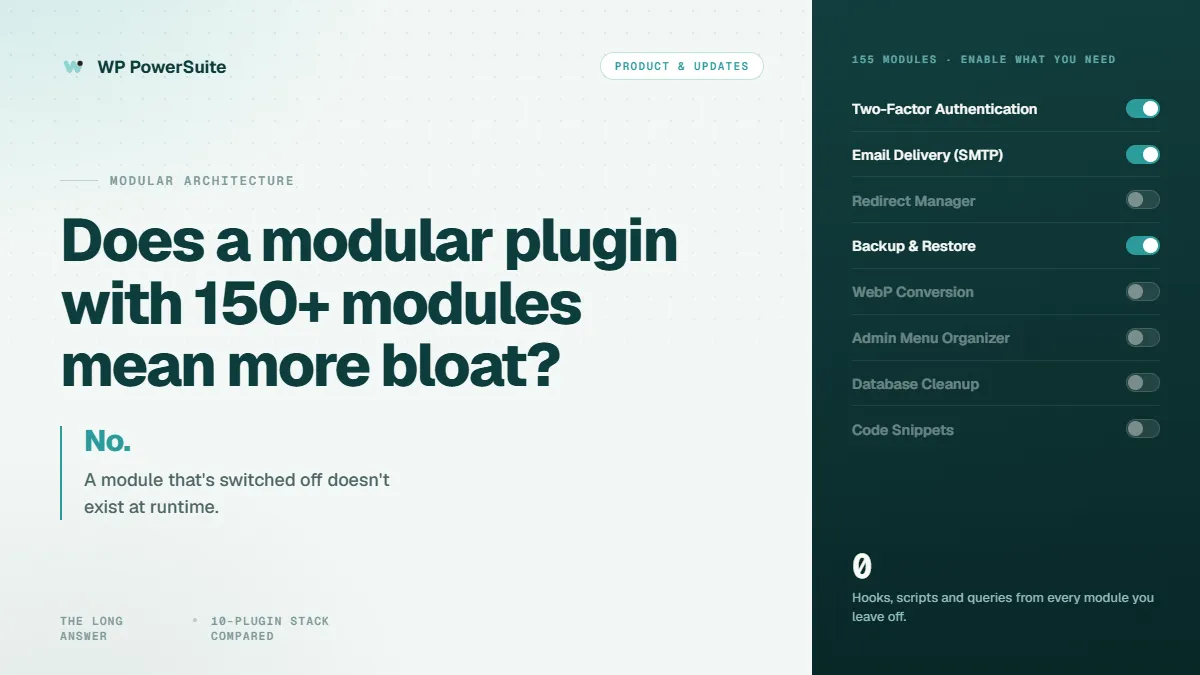
A modular WordPress plugin fundamentally redefines how functionality is delivered and consumed within your WordPress site. Instead of bundling every feature into a single, always-active package, a modular WordPress plugin like WP PowerSuite integrates 155 distinct WordPress tools, allowing users to enable only the specific modules their site truly needs. This innovative approach ensures that if a module is off, it doesn't exist at runtime, registering no hooks, enqueuing no assets, and performing no database reads, effectively providing the breadth of a plugin marketplace with the footprint of a minimal install.
Definition of Modular WordPress Plugins
A modular WordPress plugin lets users activate only the functionality they need instead of requiring every available feature to be used. WP PowerSuite exemplifies this by offering 155 WordPress tools within a single, unified framework. Every plan includes all modules, but the key is that you enable only the specific tools your WordPress site requires, thereby eliminating unnecessary overhead. This design ensures that disabled modules remain entirely inert at runtime, preventing them from registering hooks, enqueuing assets, or performing any database queries, thus maintaining a lightweight WordPress workflow.
Benefits of Modular Design
The benefits of a modular design, particularly for a comprehensive WordPress toolkit like WP PowerSuite, are substantial. This modular WordPress plugin is specifically engineered to reduce common issues such as plugin overlap and compatibility problems that often plague WordPress sites. Its architecture ensures that only actively used modules load their resources, meaning disabled modules never enqueue scripts or run hooks, contributing to superior WordPress performance. The per-module settings ensure that advanced controls only appear for the modules you're actively using, streamlining the user experience and preventing settings sprawl within the intuitive PowerSuite dashboard, which offers category tabs, search, and clear on/off states for every module.
Comparison with All-in-One Plugins
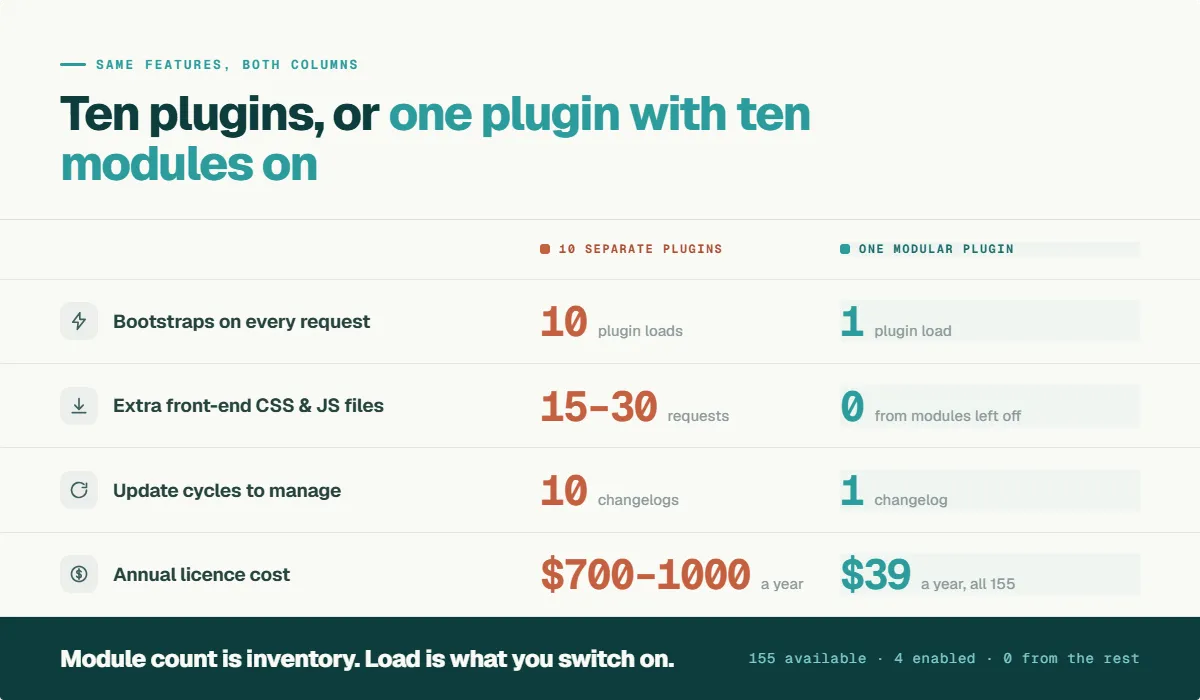
When comparing a modular WordPress plugin to traditional all-in-one plugins or a typical 10-plugin stack, the advantages become clear, especially concerning cost and WordPress performance.
A conventional plugin stack often reaches a yearly cost of $700–$1000 across multiple premium licenses, with varying renewal dates and vendors.
| Modular wordpress plugin - single-site stack current published renewal pricing | |||
|---|---|---|---|
| Plugin | Purpose | Price (current published renewal) | Link |
| Wordfence Premium | Security | $149/year | Wordfence Premium |
| WP Mail SMTP Pro | Email delivery | $49–$99/year | WP Mail SMTP Pro |
| UpdraftPlus Premium | Backups | From $70/year | UpdraftPlus Premium |
| WPForms Pro | Forms | $199–$399/year | WPForms Pro |
| Smush Pro | Image optimization | Roughly $90/year | Smush Pro |
That is already $550–$800 for five plugins, before adding a premium SEO tool, a page builder license, or a duplicate-post utility. In stark contrast, WP PowerSuite, starting from $39/year, offers all 155 modules under a single renewal and invoice.
Furthermore, each active plugin in a standard stack typically enqueues its own CSS/JS, potentially adding 15–30 extra requests per page, which can significantly impact page load times (you can verify this on any site using the free Query Monitor plugin; independent performance research from hosts such as Kinsta documents the same pattern).
WP PowerSuite, by its modular design, only loads assets for enabled modules and only where absolutely needed, ensuring zero additional requests or queries when a module is disabled, thereby optimizing your WordPress website.
Is WordPress Still Relevant in 2026?
Yes. WordPress remains the most widely used content management system on the web, powering roughly 43% of all websites according to W3Techs. No competing platform comes close to its ecosystem of themes and plugins, its developer community, or its flexibility for everything from blogs to WooCommerce stores. The platform itself is not the problem in 2026. The way sites accumulate plugins is.
Why Are Some Users Moving Away From WordPress?
When WordPress users churn to hosted website builder platforms, the reasons they cite are rarely about WordPress core. They cite maintenance fatigue from updating a dozen separate plugins, unpredictable conflicts between themes and plugins, and cost stacking as each premium plugin renews on its own schedule. In other words, the pain is plugin sprawl, not the platform. A modular WordPress plugin addresses exactly this: one install, one update cycle, one invoice, and a curated set of tools engineered to work together. For most site owners weighing whether to leave WordPress, consolidating their plugin stack solves the actual complaint while keeping the full control and ownership that made them choose WordPress in the first place.
Does Having 150+ Modules Make WordPress Bloated?
Having 150+ modules available does not mean a WordPress website needs to use all 150+ modules, nor does it automatically lead to bloat. WP PowerSuite provides 155 WordPress modules while allowing site owners to choose which tools are relevant to each website. The core distinction lies in how these modules are managed and activated, ensuring that only the functionality actively in use impacts your site's performance. This intelligent approach prevents the common pitfalls associated with traditional all-in-one plugins that might load unnecessary code.
Understanding Plugin Bloat
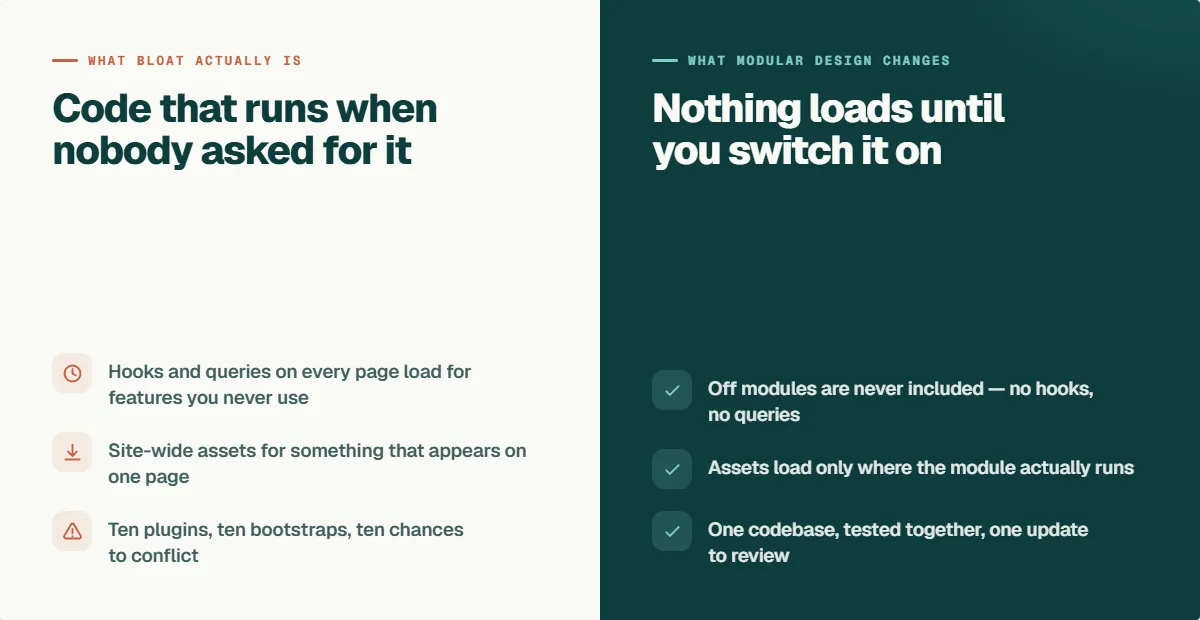
Many WordPress sites suffer from plugin bloat, which can lead to conflicting code, potential security vulnerabilities, and ultimately, poor performance. Performance audits frequently attribute slow Time to First Byte and unsatisfactory Core Web Vitals to plugin overhead rather than hosting limitations. A typical setup with ten active plugins means managing ten separate update cycles, ten sets of scripts, and ten potential points of conflict. Each active plugin, by its nature, loads its own CSS and JS on every page, a cumulative effect that visitors notice and Core Web Vitals objectively measure, highlighting the need for a more efficient plugin management strategy.
WP PowerSuite’s Approach to Module Management
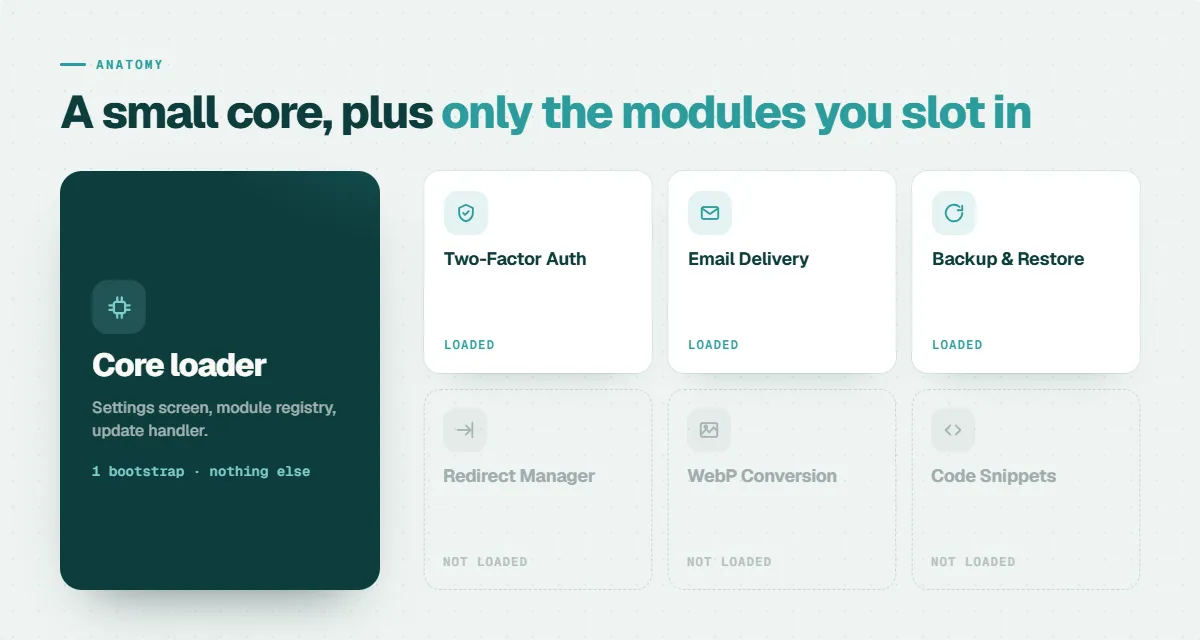
WP PowerSuite’s innovative approach to module management is central to its promise of a high-performing WordPress site, consolidating an extensive WordPress toolkit into one optimized, developer-friendly solution. Operating at the WordPress core level, this modular WordPress plugin is meticulously designed to integrate seamlessly with standard WordPress themes, leading page builders, and WooCommerce, ensuring broad compatibility. The fundamental principle is that a disabled module never loads; its associated hooks, scripts, and styles remain entirely off the critical path, meaning zero impact on your WordPress performance. This modular architecture ensures your site only loads the specific functionalities that are actively switched on, precisely addressing the concern of plugin bloat.
Active vs. Inactive Modules
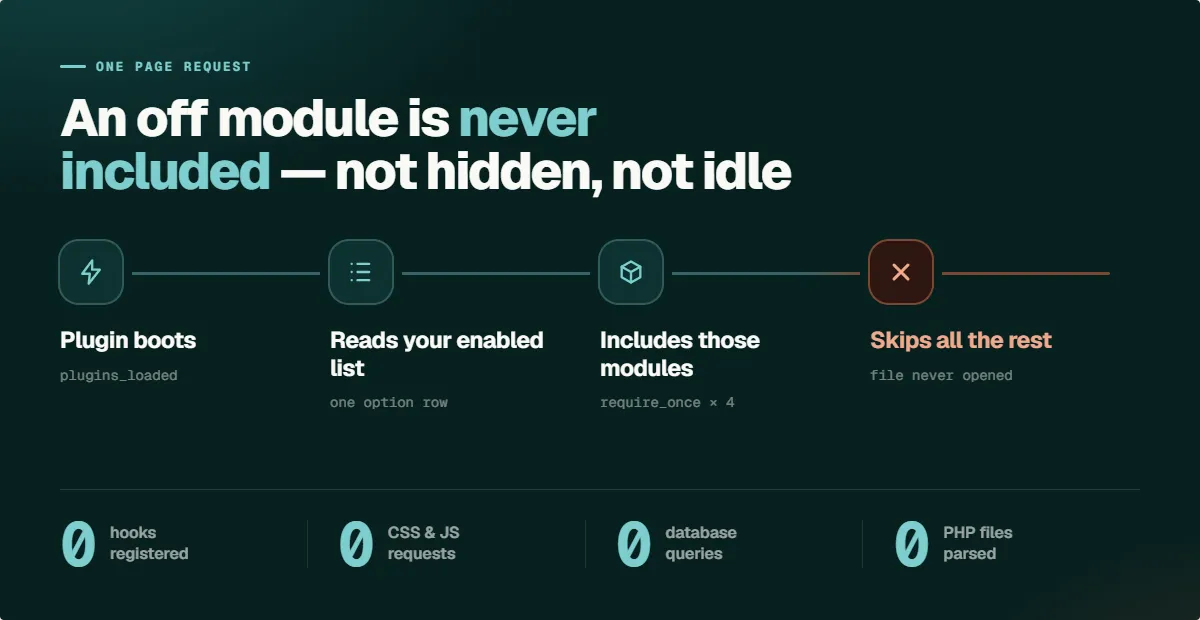
The core principle behind WP PowerSuite’s efficiency is the clear distinction between active and inactive modules. If a module is deactivated, it simply doesn't exist at runtime, meaning there are absolutely no performance costs associated with its presence. Disabled modules never enqueue scripts, never register hooks, and perform no database queries, ensuring they add zero requests and zero overhead to your WordPress site. This intelligent, on-demand loading mechanism is paramount to maintaining a lightweight WordPress environment, allowing users to leverage a vast WordPress toolkit without the common drawbacks of plugin bloat.
How Does WP PowerSuite’s Modular Approach Work?
WP PowerSuite’s modular approach empowers users with unparalleled control over their WordPress site’s functionality and performance. It works by allowing you to selectively enable and disable modules as needed, ensuring that only the active tools contribute to your site’s operational load. This method provides the flexibility of a vast WordPress toolkit while maintaining a lean and efficient WordPress environment. By understanding this system, users can fully leverage the plugin's capabilities without concerns about unnecessary bloat or performance degradation.
Enabling and Disabling Modules
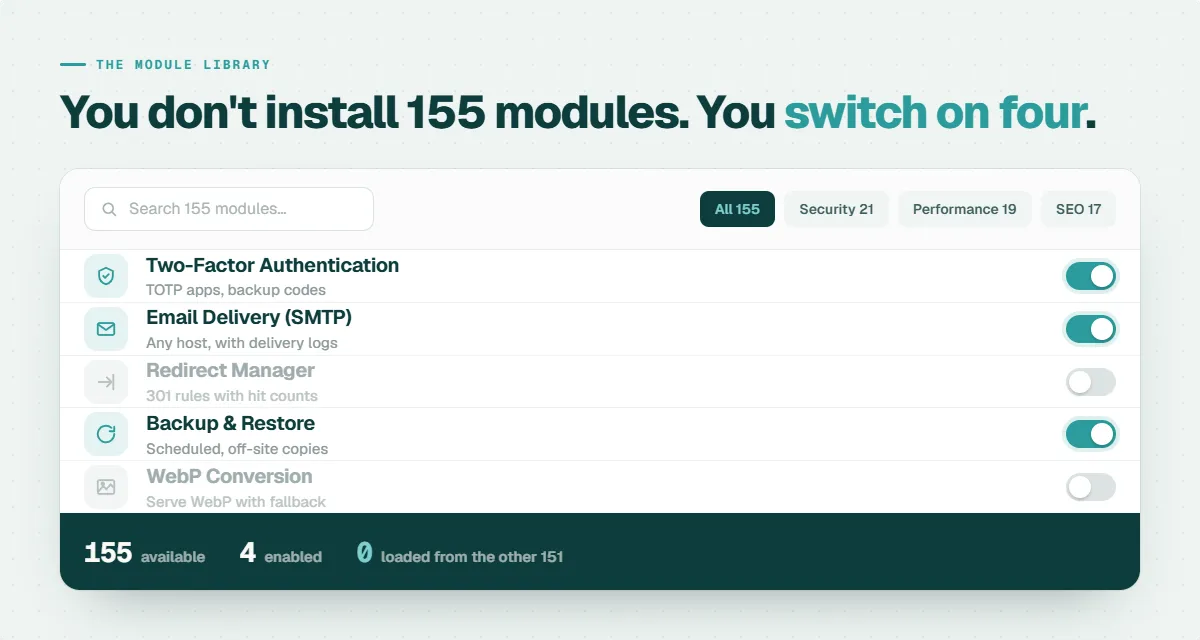
The modular WordPress plugin in WP PowerSuite makes enabling and disabling features fast and intuitive. From the central PowerSuite dashboard you can target only the modules you need, keeping unused features out of the critical path. Clear category tabs, a powerful search, and a visible on/off switch for each module let you manage functionality like flipping a switch. Contextual settings appear only for active modules, reducing clutter and simplifying configuration so your WordPress site stays lean and focused.
- Open the PowerSuite dashboard in your WordPress admin.
- Find the module using the category tabs or the search bar.
- Toggle the module on.
- Configure the contextual settings that appear for that active module.
Examples of Available Modules
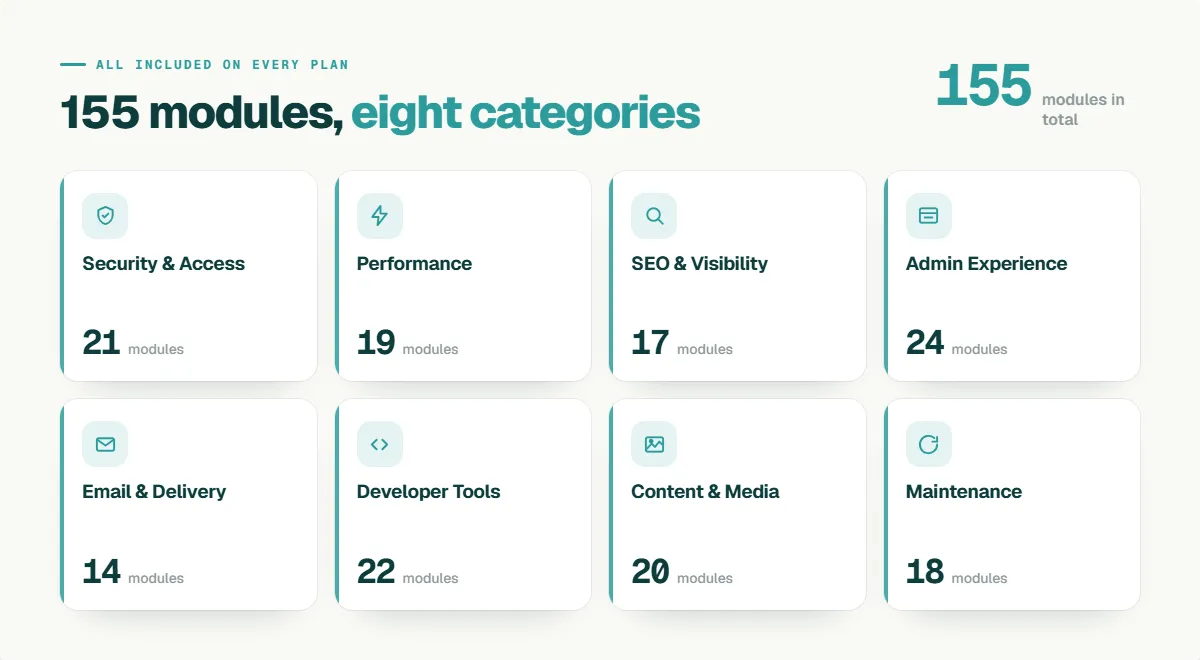
WP PowerSuite offers an extensive array of modules, forming a comprehensive WordPress toolkit designed to cover nearly every aspect of WordPress site management.
- Security: Limit Login Attempts, Two-Factor Authentication (2FA), reCAPTCHA — robust login security for your WordPress site and WP dashboard, protecting users and admin access while fitting a modular wordpress plugin workflow and integrating with WordPress users and roles.
- Email: SMTP / Email Delivery, Email Logging — reliable SMTP setup for transactional email, delivery monitoring and logs for forms and notifications, improving deliverability for newsletters, WooCommerce receipts, and builder plugins that rely on email from your WordPress website.
- Content & Admin: Admin Menu Organizer, Admin Logo, Admin Notices Manager (hide/manage notices), Dashboard Columns, Display Active Plugins First, Hide Admin Bar, Disable Comments — admin customization tools to streamline the dashboard, customize layout and grid views, improve user experience for clients and editors, and integrate with page builders (Gutenberg, Elementor, Beaver Builder) in a modular wordpress plugin architecture.
- Utilities: Backup & Restore, Activity Log (user activity tracking), Redirect Manager, Coming Soon & Maintenance Mode, Disable Auto-Update Emails — modular utilities that support workflow, restore templates and layouts, track changes across plugins and themes, and manage redirects and maintenance behavior for SEO and client sites.
- Speed: WebP Support (convert/serve WebP), Disable Emojis, Disable Heartbeat — performance modules to speed up your WordPress website, improve image galleries and gallery plugin performance (including compatibility with Modula gallery plugins), optimize sliders and gallery plugins, and enhance overall builder functionality for both free and premium plugin users.
How Are Updates and Maintenance Handled?
Updates are one of the most underrated advantages of a modular WordPress plugin. With a traditional stack of ten separate plugins, you manage ten update schedules, ten changelogs, and ten vendors, and every update carries a small risk of breaking something another plugin depends on. WP PowerSuite consolidates all of that into a single update cycle. Every one of the 155 modules is developed, tested, and released together by one vendor, which means module updates cannot conflict with each other the way independently developed plugins can. You review one changelog, click update once, and your entire toolkit moves forward in lockstep. Disabled modules receive the same code updates but continue to load nothing at runtime, so maintenance stays simple regardless of how many modules you actually use.
Practical Use Cases for Different Websites
The practical use cases for WP PowerSuite’s modular design are incredibly diverse, demonstrating its flexibility across various WordPress website types.
- New site launch: Limit Login Attempts, Two-Factor Authentication, Email Delivery (SMTP), WebP Conversion, Backup & Restore.
- Migration: Redirect Manager, 404 Error Log, Coming Soon & Maintenance.
- Client handover: Admin Logo, Custom Admin Footer Text, Hide Admin Notices, Admin Menu Organizer — create a clean, branded WordPress dashboard.
- Performance sprint: Speed modules such as disable emojis, disable Heartbeat, remove query strings to complete optimization tasks quickly.
What Features Should You Look For in a Modular WordPress Plugin?
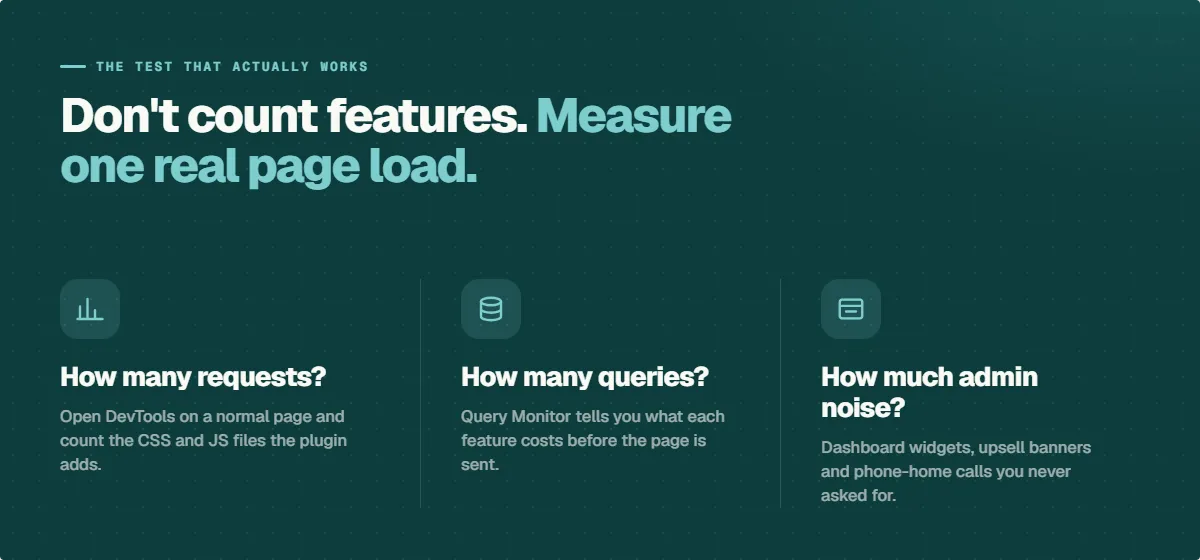
Not every plugin that advertises many features is genuinely modular. Before committing to any modular WordPress plugin, evaluate it against these criteria:
- True conditional loading. Disabled features should load zero code. Verify this yourself with the free Query Monitor plugin: toggle a module off and confirm no scripts, styles, or queries from it appear on the front end.
- Per-module settings. Configuration screens should only appear for modules you have enabled, keeping the WordPress dashboard clean.
- A single, searchable dashboard. Look for category organization, search, and clear on/off states so you can manage dozens of tools without hunting through menus.
- No per-module upsells. Some suites split features between a free version and a pro version, or gate individual modules behind higher tiers. Transparent pricing means every plan includes every module.
- Settings export and import. If you manage client sites, the ability to copy a proven configuration to a new install saves hours on every build.
- Compatibility with your stack. The plugin should work with your WordPress theme, your page builder of choice, and WooCommerce without conflicts.
WP PowerSuite was built against this exact checklist: conditional loading you can verify, contextual settings, a searchable dashboard with category tabs, all 155 modules on every plan with no feature gating, settings export for agencies, and core-level compatibility with themes and builders.
Does a Modular Plugin Work With Your Existing WordPress Theme or Page Builder?
Yes. This is one of the most common questions from WordPress users considering consolidation, and the answer comes down to where the plugin operates. WP PowerSuite works at the WordPress core level through standard hooks and APIs rather than modifying templates or output directly. That means it is compatible with any properly coded WordPress theme, whether free or premium.
The same applies to page builders. Whether you build with Elementor, Bricks, Beaver Builder, or the native Gutenberg block editor, WP PowerSuite's modules operate alongside your builder rather than competing with it. Your drag and drop workflow, your templates, and your existing layouts remain untouched. Modules like Redirect Manager, SMTP, and Limit Login Attempts function identically regardless of how your pages are built, while admin-side modules like Admin Menu Organizer improve the WordPress dashboard experience for every builder.
WooCommerce stores get the same treatment. Bot protection on checkout, SMTP for order emails, WebP conversion for product images, and the Activity Log all run alongside WooCommerce and its extensions without interfering with your store's theme or builder templates.
Can WP PowerSuite Replace Multiple WordPress Plugins?
WP PowerSuite, a robust modular WordPress plugin, is strategically designed to reduce your reliance on a multitude of single-purpose WordPress plugins, thereby streamlining your WordPress site management and enhancing overall WordPress performance. It offers a comprehensive WordPress toolkit that can realistically replace several individual plugins, covering critical functionalities from security to content management.
For instance;
- Security plugin
- SMTP plugin
- backup plugin
- image optimizer
- AI forms
- code snippets
- login customizer
- Whitelable and branding
Reducing Dependency on Separate Plugins
The core objective of WP PowerSuite as a modular WordPress plugin is to significantly reduce the dependency on numerous separate WordPress plugins, which often leads to complex plugin management and potential conflicts. This integrated WordPress toolkit offers a wealth of functionalities that directly address the needs typically met by multiple individual plugins. For example, it effectively covers the essential jobs of security plugins by providing robust protection measures, manages email communications through its SMTP plugin capabilities, and ensures data integrity with its backup plugin features. Moreover, it includes functionalities found in dedicated forms plugins, optimizes media with image optimizers, and handles URL routing with redirects plugins, consolidating these diverse capabilities into one cohesive, lightweight WordPress plugin, thus simplifying the workflow for any WordPress site owner.
When Specialized Plugins are Preferred
While WP PowerSuite is a powerful modular WordPress plugin, it’s important to acknowledge that there are specific scenarios where a dedicated, highly specialized WordPress plugin remains the preferred choice. This is typically the case when a WordPress site requires the absolute deepest version of a particular functionality, such as a comprehensive SEO suite that includes advanced content analysis tools, an enterprise-level form platform with intricate payment integrations, or a niche WooCommerce extension designed for highly specific e-commerce needs. WP PowerSuite’s strategic goal is to effectively replace the ten medium-depth plugins that often surround one or two truly specialist tools on a WordPress website. Most sites, in reality, operate with a few critical standalone plugins complemented by a dozen or so that could be consolidated, and it is precisely for these dozen common, yet essential, tasks that WP PowerSuite, as a modular WordPress toolkit, provides an unparalleled solution.
Common Management Tasks Consolidated
WP PowerSuite excels at consolidating a wide array of common management tasks into one efficient modular WordPress plugin, significantly enhancing your WordPress site management. It effectively centralizes security hardening, essential SEO plumbing, media optimization, and robust content tooling. Furthermore, it streamlines login control, adds polish to the admin dashboard through extensive customization options, offers various site utilities, and contributes to speed wins by optimizing performance. Key common management tasks such as backup and restore, reliable email delivery via SMTP, basic forms creation, and intuitive two-factor authentication, AI-driven alt text generation, and a diverse range of admin and site tools, including options for admin menu organization, login page customization, dashboard column control, and the ability to display active WordPress plugins first, all contributing to a more organized and efficient workflow for WordPress users.
Addressing Common Concerns
WP PowerSuite directly addresses prevalent concerns about WordPress plugin bloat and performance, demonstrating that a vast WordPress toolkit can be managed efficiently without compromising site speed. By understanding the distinction between available capabilities and active usage, and by acknowledging various performance factors, this modular WordPress plugin builds trust through transparency and practical design, ensuring that its comprehensive features contribute positively to your WordPress website.
Difference Between Capabilities and Active Usage
The fundamental difference between a WordPress plugin's available capabilities and its active usage is central to understanding WP PowerSuite’s efficiency as a modular WordPress plugin. Disabled modules within WP PowerSuite never load; their associated hooks, scripts, and styles remain entirely off the critical path, ensuring they consume zero resources. This sophisticated modular architecture is precisely designed to prevent any slowdowns that might otherwise arise from inactive modules. Essentially, your WordPress site only loads and processes the functionality that is actually switched on, meaning the presence of 155 modules does not equate to all 155 modules actively running, thereby mitigating WordPress plugin bloat.
Factors Influencing WordPress Performance
Understanding the multiple factors influencing WordPress performance is crucial when considering any WordPress plugin. Every active WordPress plugin inherently adds weight to a WordPress site, contributing to its overall load. A typical setup involving ten active WordPress plugins means managing ten distinct sets of scripts and ten potential locations where a conflict or performance bottleneck could arise. Performance audits consistently reveal that slow Time to First Byte and unsatisfactory Core Web Vitals often trace back directly to accumulated plugin overhead; Google's own Core Web Vitals documentation explains how these metrics measure real user experience. Each active plugin, by its nature, loads its own CSS and JavaScript on every page, a cumulative effect that directly impacts visitor experience and is objectively measured by Core Web Vitals, underscoring the importance of a lightweight WordPress plugin strategy.
Trust and Transparency in Plugin Recommendations
Building trust and maintaining transparency are paramount in providing effective WordPress plugin recommendations, especially for a comprehensive modular WordPress plugin like WP PowerSuite. To underscore its commitment to user satisfaction and confidence, WP PowerSuite offers a straightforward 14-day money-back guarantee. This policy ensures that if the plugin doesn't unequivocally prove its value and earn its place on your WordPress site within the initial two weeks, a full refund is provided without any complicated forms or interrogation, demonstrating a high degree of transparency. Furthermore, the pricing structure is clear and upfront, including all 155 modules with every plan, eliminating any hidden fees or unexpected surprises. Unlike many premium WordPress plugins that split functionality between a limited free version and a pro version, there is no feature gating or per-module upsells in WP PowerSuite, reinforcing its commitment to a transparent and trustworthy user experience.
FAQs About Modular WordPress Plugins
Navigating the world of WordPress plugins can raise many questions, particularly concerning modular solutions and potential bloat. These FAQs aim to directly answer common inquiries about modular WordPress plugins, WP PowerSuite, and how they contribute to an optimized WordPress site.
What is a modular WordPress plugin?
A modular WordPress plugin, such as WP PowerSuite, is an innovative WordPress toolkit that integrates a multitude of WordPress tools into a single plugin package. It allows WordPress users to selectively enable only the specific functionalities their WordPress site requires, ensuring that all other features remain completely inactive. This design means that each feature operates as a self-contained module, which only loads and consumes resources when explicitly turned on, thereby providing a lightweight WordPress plugin experience.
Does WP PowerSuite load all 150+ modules?
No, WP PowerSuite does not load all 155 modules simultaneously; this is a common misconception about modular WordPress plugins. A disabled module within WP PowerSuite never loads its associated code; its hooks, scripts, and styles remain entirely off the critical path, ensuring no impact on your WordPress site's performance. The fundamental principle of this modular architecture is that your WordPress site only loads and runs the specific functionalities that you actively switch on, effectively preventing plugin bloat and maintaining a lightweight WordPress environment.
Can WP PowerSuite reduce the number of WordPress plugins I use?
Yes, WP PowerSuite is specifically designed to significantly reduce the number of individual WordPress plugins you use on your WordPress site. As a comprehensive modular WordPress plugin, it can effectively replace numerous single-purpose plugins, thereby streamlining your WordPress plugin stack. This includes common solutions like security plugins (offering features such as 2FA and login limits), SMTP plugins for reliable email delivery, backup plugins for data protection, redirect plugins for managing URLs, image optimizers (supporting formats like WebP and AVIF), contact form plugins, and even code snippets plugins, consolidating these functionalities into one efficient WordPress toolkit.
Is an all-in-one WordPress plugin always bloated?
No, an all-in-one WordPress plugin is not inherently bloated, especially when it employs a modular design like WP PowerSuite. The key distinction lies in whether the plugin loads all its functionalities at once, regardless of active use, or if it allows users to selectively enable only the modules they need. A truly modular WordPress plugin prevents bloat by ensuring that disabled features do not contribute to the site’s load, maintaining optimal WordPress performance and an efficient WordPress workflow.
Will WP PowerSuite conflict with my page builder or theme?
No. WP PowerSuite operates at the WordPress core level using standard hooks and APIs, so it runs alongside any well-coded WordPress theme and every major page builder, including Elementor, Bricks, Beaver Builder, and the Gutenberg block editor. Your existing layouts, templates, and drag and drop workflow are unaffected.
Who is WP PowerSuite designed for?
- Freelancers: standardize client builds and speed up launches with a single robust modular WordPress plugin that simplifies license and settings management.
- Agencies: deploy a consistent modular WordPress plugin stack across unlimited sites with white‑label admin, easy settings export, and streamlined client rollouts.
- Site owners: secure sites, reliable backups, and consistent email delivery from one modular WordPress plugin, avoiding the hassle of multiple individual extensions.
- WooCommerce stores: protect checkout with bot prevention, ensure order emails via SMTP, optimize product images with WebP, and track staff actions using a modular WordPress plugin tailored for e‑commerce.
Conclusion
The answer to the question in the title is clear: module count and bloat are two different things. WP PowerSuite delivers 155 powerful modules in a single modular WordPress plugin, yet a disabled module contributes literally nothing to your site's load. No hooks, no scripts, no queries. That architecture eliminates the real causes of plugin bloat: overlapping code, conflicting updates, and assets loading on pages that never use them.
We encourage you to browse the full module library, using the search and filter functions to map WP PowerSuite's capabilities against your current list of WordPress plugins. Most site owners find that ten or more single-purpose plugins can be retired on day one, while their one or two truly specialist tools remain in place.
| Plan | Sites | Modules | Pricing |
|---|---|---|---|
| Solo | 1 | All 155 | Start from: $39.99 |
| Freelancer | 25 | All 155 | Start from: $119.99 |
| Agency | Unlimited | All 155 | Start from: $199.99 |
All plans include all 155 modules with no locked features. Licenses are available as Yearly or Lifetime and are backed by a 14-day money-back guarantee.